


We live in a remarkable time, where advancing technologies and access to information are increasing opportunities and empowering people like never before. But as innovation accelerates, we face a challenge: how to ensure these advancements empower everyone equally. Specifically, what are our responsibilities regarding accessible website design? For nonprofits, a strong commitment to digital accessibility in website design should be a priority—an opportunity not only to demonstrate an organization’s commitment to values of equity and inclusion by designing accessible nonprofit websites, but also to amplify their social impact through their digital strategy.
Let me use a real-world example. While commuting on the bus to the office one morning, an announcement over the intercom notified passengers that another bus had broken down on the road, causing delays. The majority of people on the bus groaned and took out their phones to notify their employers of their delay. That wasn’t true for the man sitting next to me; in fact, he didn’t react at all. After he noticed that the people around him looked concerned, he politely tapped my arm and said, “I’m deaf. What happened?”
Similar situations happen all the time online. While digital experiences often take into account user experience, the vast majority don’t pay as much attention as they should to the unique abilities of their diverse user base. And for nonprofits that care deeply about equity and inclusion, failing to design accessible online experiences not only makes it harder to advance their mission, but it can also be in direct conflict with their values.
The good news? Digital accessibility design has made tremendous strides in recent years. The bar has been raised, and accessible website design is expected, not a nice-to-have. The more organizations commit to accessibility online, the more we’ll be able to make progress towards an equitable web. But before we consider how to ensure online equity, it’s probably a good idea to start by reviewing the history of web accessibility standards (or the lack thereof).
A Brief Legal History of Accessibility
In 1990, America’s focus on accessibility was officially ratified with the Americans with Disabilities Act (ADA). By establishing a framework that prohibits discrimination and enforces protections for the disabled, this Act ultimately helped pave the way for occupational and resource-access equity for all Americans, regardless of their physical or mental abilities.
Since then, several new laws and amendments have emerged to broaden the scope of rights for disabled citizens. In 1997, a redraft of Section 508 of the Rehabilitation Act was enacted into law to specifically regulate the accessibility of electronic and information technology produced by the federal government. In 2010, the United States Department of Justice released a notice stating that Title III of the ADA, which covers “public accommodations,” is being revisited to determine whether Internet-based properties should be covered under its umbrella. In 2017, the government withdrew its inquiry, stating primarily that it required more input from the general public.
While these government milestones were occurring, it was individuals and organizations that understood the importance of creating an equally accessible Internet for all who took the lead in developing the frameworks that shape how we think about web accessibility today. Some dominant areas of focus are website design and development standards and best practices, establishing quantifiable inspection metrics, and creating testing software to gauge how well your site is working.
Why Your Nonprofit Should Make Website Accessibility a Priority
When it comes to creating a truly impactful web experience, your number one priority should always be effectively delivering information to the visitor: whether you’re raising awareness about your cause, educating them about initiatives, or encouraging participation. However, when attempting to engage your target audience, you need to be sure you aren’t isolating anyone in the process. Ask yourself: “How will my website be experienced by users that may be hard of hearing, blind or low-vision, as well as users with restricted mobility or learning disabilities?”
Just as probing at our client’s assumptions helps us understand “why” they’re committed to their mission, implementing accessibility standards can help drive home “how” you execute your mission. The principles and workflow you establish for your website should mirror the inclusionary principles that support your organization. Fortunately, the World Wide Web Consortium (W3C)—the leading web standards organization—has established the Web Content Accessibility Guidelines (WCAG), which has the most robust set of rules and guidelines for achieving the highest level of accessibility.
Getting Your Nonprofit Started with Web Accessibility
In an attempt to make the massive scope of an accessibility initiative a bit more digestible, WCAG breaks down the steps you can take into four main categories:
Perceivable — Whatever you’re presenting on your website, whether it’s information or visual components, must be done in a way that is perceivable for the user. For instance, if you have an audio embed, you should offer a text alternative.
Operable — All user interface elements and navigation controls need to be operable by all. A great example of this is a dropdown menu: If you need to use a mouse to activate a dropdown menu, be sure you can also use your tab key to navigate it for users with limited mobility.
Understandable — It should be intuitive for the user to use the website. This could be something as straightforward as providing a way for screen readers to determine the current language of the website.
Robust — The information on your website should be available to a wide range of devices, particularly those designed to accommodate users with accessibility concerns. Much of the effort here pays specific attention to how the website is built, especially regarding the code.
Each of these categories is divided into guidelines — Level A, AA, and AAA — with requirements for achieving conformance with each guideline. The levels generally correspond to the effort required to implement the requirement, with AAA being the most involved.
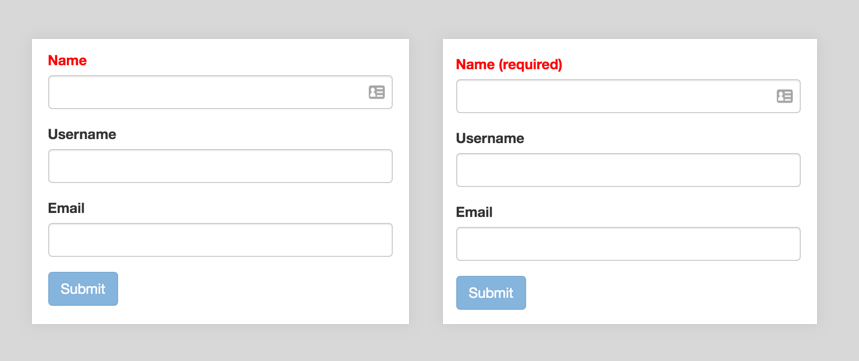
For instance, Guideline 1.4 under the Perceivable category is “Distinguishable,” which helps ensure your visitors can see and hear your content properly. An example of a Level A technique would be to include the text “(required)” in the label for required form fields, in addition to coloring the label red to designate it as required. This will ensure that the color blind can distinguish the requirement. Here’s what we mean:
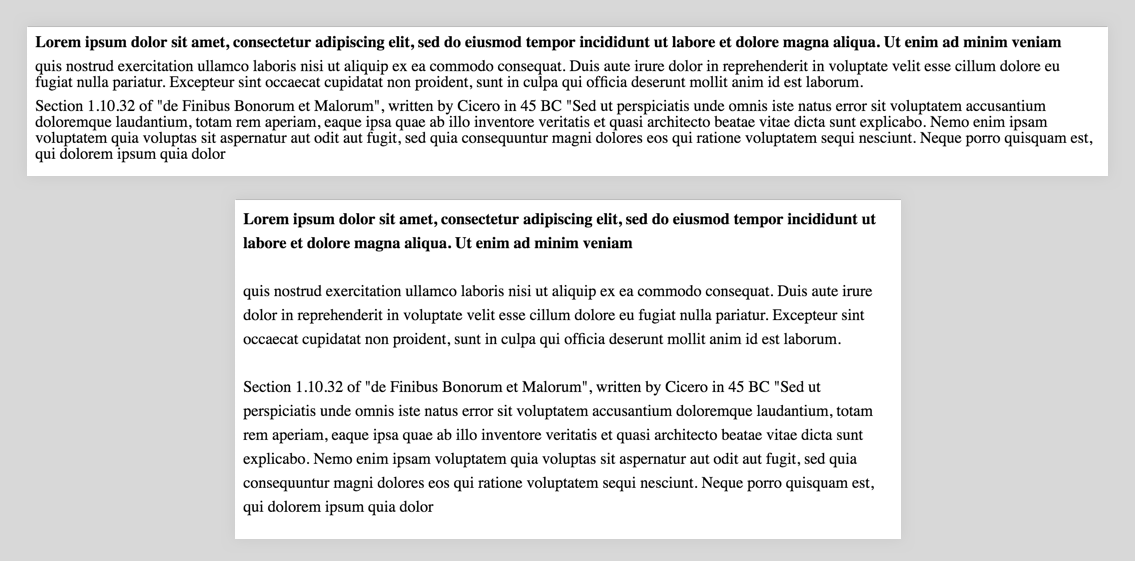
A Level AAA technique for Guideline 1.4 would be to use prescriptive standards for your text blocks, such as 80 characters per line limits, enforcing line heights of at least 1.5 times the font size, and separating paragraphs by 1.5 times the line height. An example:
A Note about Legal Obligations
It’s important to note that there are circumstances in which you’re required by law to meet accessibility standards, as is the case when your organization receives funding from the federal government. Additionally, there’s been a strong focus on organizations with physical locations, and the website is seen as an extension of them. It’s always a safe bet to consult with your legal team to identify any obligations.
How to Test Your Nonprofit’s Website for Accessibility
While the topics governed under accessibility guides may seem a little overwhelming (and truthfully, they can be), fortunately, there are plenty of tools at your disposal to help you diagnose, test, and refine your accessibility efforts.
Regarding diagnostics, tools such as the Web Accessibility Evaluation Tool (WAVE) or the Audits tab in the Chrome Developer Tools do a really great job of providing you with the big, Level-A compliance takeaways, and more. From there, your team can start to address changes like tab orders, color contrast issues, and proper document heading hierarchy. These tools will pinpoint the exact locations on your pages where the issues exist, provide some description of the issue and the WCAG category it pertains to, and offer suggestions to help boost your accessibility score.
After working through these diagnostics, your next step should be to start with actual accessible interface testing. For instance, to test the accessibility of your content, you can employ the use of screen readers such as ChromeVox or NVDA to see how accessibility devices function on your website. For folks who use switches for navigating your site, performing a simple keyboard accessibility test by using your “tab” key will show how well people with limited mobility can navigate the information.
Lastly, nothing will better educate you about how accessible your site is than some good old-fashioned user testing. Being able to see firsthand how various audience types access your website provides crucial insight into how your accessibility efforts are tracking. Not to mention, it also helps build a little empathy for the people you are working to accommodate.
Moving Forward
Ultimately, the values reflected on your nonprofit’s website also guide your organization. And to deliver a truly equitable web, accessibility design must be about more than just ticking the boxes to meet requirements. It has to be about an ongoing pursuit to make the world more open, inclusive, and compassionate. Does it cost more and take more time? Absolutely. But it’s also an example of living your values—an opportunity to lead by example and promote the change online that your nonprofit puts at the center of its mission in the physical world.
